
A good visual idea often breaks down in the editing stage. The user knows what should change, but the software demands a technical answer first: which layer, which mask, which brush, which selection, which adjustment panel. That gap is exactly where an online AI Photo Editor becomes useful. It lets users describe the result they want instead of manually building every edit from scratch.
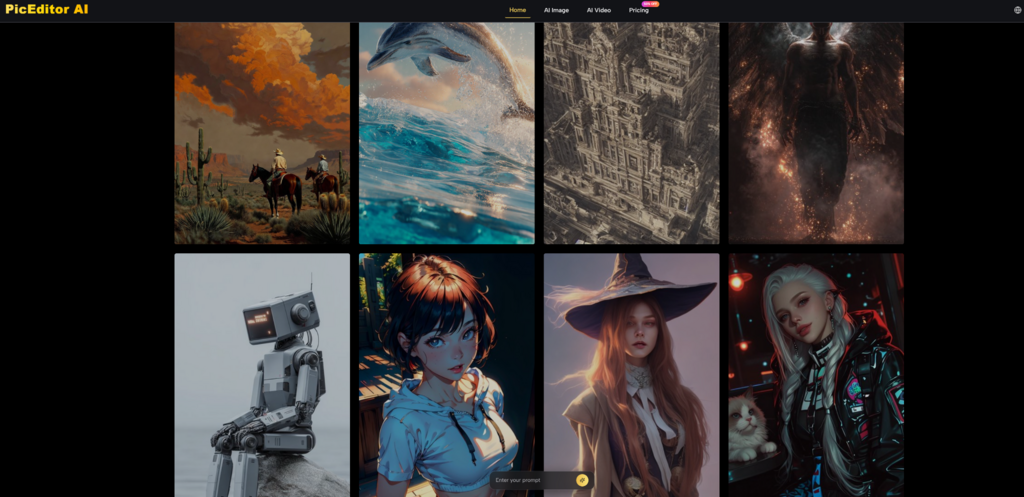
PicEditor AI works best when understood as a practical AI editing workspace, not as a decorative image toy. Its official pages present a platform for enhancing images, removing backgrounds, erasing objects, replacing backgrounds, generating images, transforming styles, upscaling visuals, and turning still photos into video-style content. The value is not only that these tools exist in one place. The value is that many everyday edits can begin with a simple image and a clear instruction.
The Real Problem Is Editing Friction
Most image editing problems are not creative problems. They are workflow problems. A marketer may need a cleaner campaign visual. A small business owner may need a sharper product image. A creator may want a different background or a more polished social post. These are not always complex design jobs, but they often become slow when handled through traditional software.
PicEditor AI reduces that friction by making the edit feel more conversational. The user starts with the image or prompt, chooses the kind of change they want, and lets the AI process the request. This does not remove the need for judgment, but it does reduce the number of manual steps between intention and output.
Users Start With Goals Instead Of Tools
The platform makes sense because most people think in outcomes. They do not say, “I need a precise selection workflow.” They say, “Remove this background,” “make this clearer,” “change the style,” or “turn this image into something more dynamic.”
Clear Intent Becomes The Main Control
This goal-first approach is useful because it shifts control from technical manipulation to visual direction. Instead of learning every editing function, the user focuses on describing what should happen. That is not a small change. It makes image editing more accessible to people who need strong visuals but do not want to become professional retouchers.
The tradeoff is obvious: prompt-based editing is faster, but not always perfectly predictable. That is why the best results usually come from clear instructions and careful review.
How The Official Workflow Actually Works
The platform’s official workflow is straightforward. It does not require the user to think like a Photoshop expert. It presents image editing as a sequence of choosing a task, providing an input, describing the edit, and reviewing the AI-generated result.
This section stays close to the website’s actual logic. It does not add unsupported steps such as mandatory downloads, hidden export rules, manual model selection, or guaranteed free quotas that are not clearly stated as part of the basic user flow.
Step One: Pick The Visual Editing Task
The first step is deciding what kind of result is needed. The website presents tools for common image tasks such as enhancing, upscaling, removing backgrounds, erasing unwanted objects, generating images, transferring styles, and working with photo-to-video ideas.
The Task Narrows The AI Direction
Choosing the task matters because it gives the AI a clearer job. A background removal request is different from a style transformation. An upscaling task is different from object erasing. A photo animation idea is different from a simple enhancement.
A user should not begin by asking the platform to “make it better” unless they are experimenting. A sharper task usually produces a more useful result.
Step Two: Provide The Image Or Prompt
The next step is giving the platform its starting material. For editing existing photos, the user uploads an image. For generation workflows, the site also describes text-to-image and image-to-image paths, where text can create a new visual or guide changes to an existing one.
The Input Defines The Starting Boundary
An uploaded photo gives the AI a real subject, composition, and visual structure. That is useful when the user wants to preserve something from the original image while changing the background, improving clarity, removing a distraction, or exploring a new style.
A text-only prompt is more open-ended. It can create new visuals, but it also depends more heavily on prompt clarity. The user should understand this difference before judging the result.
Step Three: Describe The Desired Edit
After the input is ready, the user describes what should change. The platform’s editing concept depends heavily on instruction. The clearer the instruction, the easier it is for the AI to produce something close to the desired outcome.
Specific Prompts Reduce Random Results
A useful prompt should mention the target change, the desired look, and anything that should remain stable. For example, a product image prompt may ask for a clean background while preserving the original product shape. A portrait prompt may ask for a different style while keeping the person natural.
The result may still vary. AI image editing is not a guarantee machine. But stronger prompts usually reduce wasted attempts.
Step Four: Review And Refine The Output
The final step is reviewing the AI-generated result. This is where the user decides whether the image is ready, close enough, or worth another prompt attempt. The official platform is built for faster editing, but user judgment remains important.
Iteration Is A Normal Editing Habit
AI tools are strongest when users treat them as fast iteration engines. If the first output is not right, the next prompt can be more specific. The user can ask for a simpler background, more natural lighting, fewer changes to the subject, or a cleaner visual tone.
This process is not a failure. It is how prompt-based editing usually becomes more accurate.
A Better Fit For Practical Content Teams
PicEditor AI is especially relevant for people who create visuals regularly but do not want every image to become a full design project. That includes small ecommerce teams, solo creators, marketers, bloggers, social media managers, and anyone who needs polished images without spending hours on manual editing.
The platform’s advantage is convenience. A single workflow can support image cleanup, enhancement, background changes, creative generation, and visual experimentation. For many users, that is more useful than having one powerful tool that only solves one narrow problem.
Campaign Images Need Fast Variations
Marketing visuals often need multiple versions before one direction works. A creator may want a cleaner product shot, a more premium-looking background, or a more attention-grabbing image for a landing page.
Fast Drafts Help Teams Choose Direction
Using an AI Image Editor in this context is less about replacing creative judgment and more about accelerating early decisions. Instead of waiting for a fully manual edit, users can test different visual directions quickly and decide which one deserves further refinement.
This is useful because many visual ideas are uncertain at the beginning. Seeing several edited directions can help a team understand what feels credible, clean, or on-brand.
Product Photos Need Fewer Distractions
Product visuals often suffer from bad backgrounds, weak lighting, soft details, or unnecessary objects in the frame. The platform’s listed editing tools are directly relevant to those problems.
Cleaner Images Can Improve Presentation
For ecommerce and promotional pages, the goal is often simple: make the product easier to see and trust. Background removal, image enhancement, and object erasing can help create a cleaner presentation when the source image is usable.
However, users should not expect AI to rescue every poor photo perfectly. If the product is blurry, blocked, badly lit, or visually complex, the result may require several attempts or a better original image.
Creators Need More Than One Visual Style
Creative work often requires exploration. A user may want a softer editorial mood, a cleaner commercial style, a more artistic variation, or a new image generated from a visual reference.
Style Experiments Work Best With Boundaries
PicEditor AI’s style and generation workflows are most useful when the user gives boundaries. Instead of asking for a vague transformation, it is better to specify the intended mood, background, lighting, and subject consistency.
Creative edits can be powerful, but they can also introduce unexpected changes. That is why a careful review stage matters.
How It Compares With Manual Editing
PicEditor AI should not be described as a universal replacement for professional editing software. That would be exaggerated. Traditional tools still provide more precise control for complex retouching, layered compositions, print-ready design, brand templates, and advanced manual corrections.
Its strength is different. It offers speed, accessibility, and easier experimentation for common AI-assisted editing tasks.
| Editing Question | Manual Editing Workflow | PicEditor AI Workflow |
| Who can start quickly? | Users with editing knowledge | Users with clear visual intent |
| How are changes controlled? | Layers, selections, masks, sliders | Tools, uploaded images, prompts |
| Best everyday use | Precision retouching and design control | Fast cleanup, enhancement, and variation |
| Background edits | Manual selection and refinement | AI background removal or replacement |
| Object cleanup | Brush and clone-based retouching | AI object eraser style editing |
| Creative exploration | Slower manual versioning | Faster prompt-based experiments |
The better comparison is not “AI versus professionals.” It is “which workflow fits the current task.” For exact brand-critical edits, manual review and professional control still matter. For quick visual improvement, AI editing can save real time.
The Limits Are Worth Taking Seriously
The platform is useful, but no responsible review should pretend that every AI edit will be perfect. The result depends on the original image, the prompt, the selected task, and the complexity of the requested change.
PicEditor AI can make image editing easier, but users should still inspect the final output before publishing it. This is especially important for product images, portraits, brand materials, and any visual where accuracy matters.
Prompt Quality Changes The Outcome
Prompt quality is one of the biggest variables. A short and vague prompt may create a result that feels unfinished or mismatched. A clear prompt can guide the AI toward a more useful edit.
Instructions Should Say What To Preserve
Users should describe not only what to change, but also what to keep. If a product color must remain accurate, say so. If a face should look natural, say so. If the background should be clean but realistic, say so.
Even with strong instructions, results may vary. AI interpretation is flexible, and that flexibility can create both useful surprises and unwanted changes.
Complex Images May Need More Attempts
Busy backgrounds, small text, hands, reflective surfaces, detailed products, and crowded scenes are harder. These situations may require multiple generations or revised prompts.
Human Review Prevents Bad Outputs
The safest habit is to review edges, object shape, text accuracy, facial details, lighting consistency, and any important product features. AI can accelerate the work, but it should not replace the final visual check.
A Practical Tool For Faster Visual Decisions
PicEditor AI is most valuable when seen as a practical editing shortcut for modern content work. It helps users move from image problem to edited result without forcing them through a traditional software learning curve.
Its real promise is not that every output will be flawless. Its promise is that common visual tasks can become easier to attempt, easier to revise, and faster to test. For creators and small teams, that speed can matter more than having every advanced manual control on day one.
Used with clear prompts, realistic expectations, and careful review, the platform can make image editing feel less like a technical barrier and more like a natural part of the creative process.